
An AI sales dashboard for distributors, built on the ERP you already have.
Your ERP and your webstore already know which quotes are about to expire, which dealers have gone quiet and which carts were whole projects. This dashboard puts those in one list each Monday, ranked by the dollars at stake, so the owner decides and the team calls.
Six decisions a week, ranked by dollars at stake.
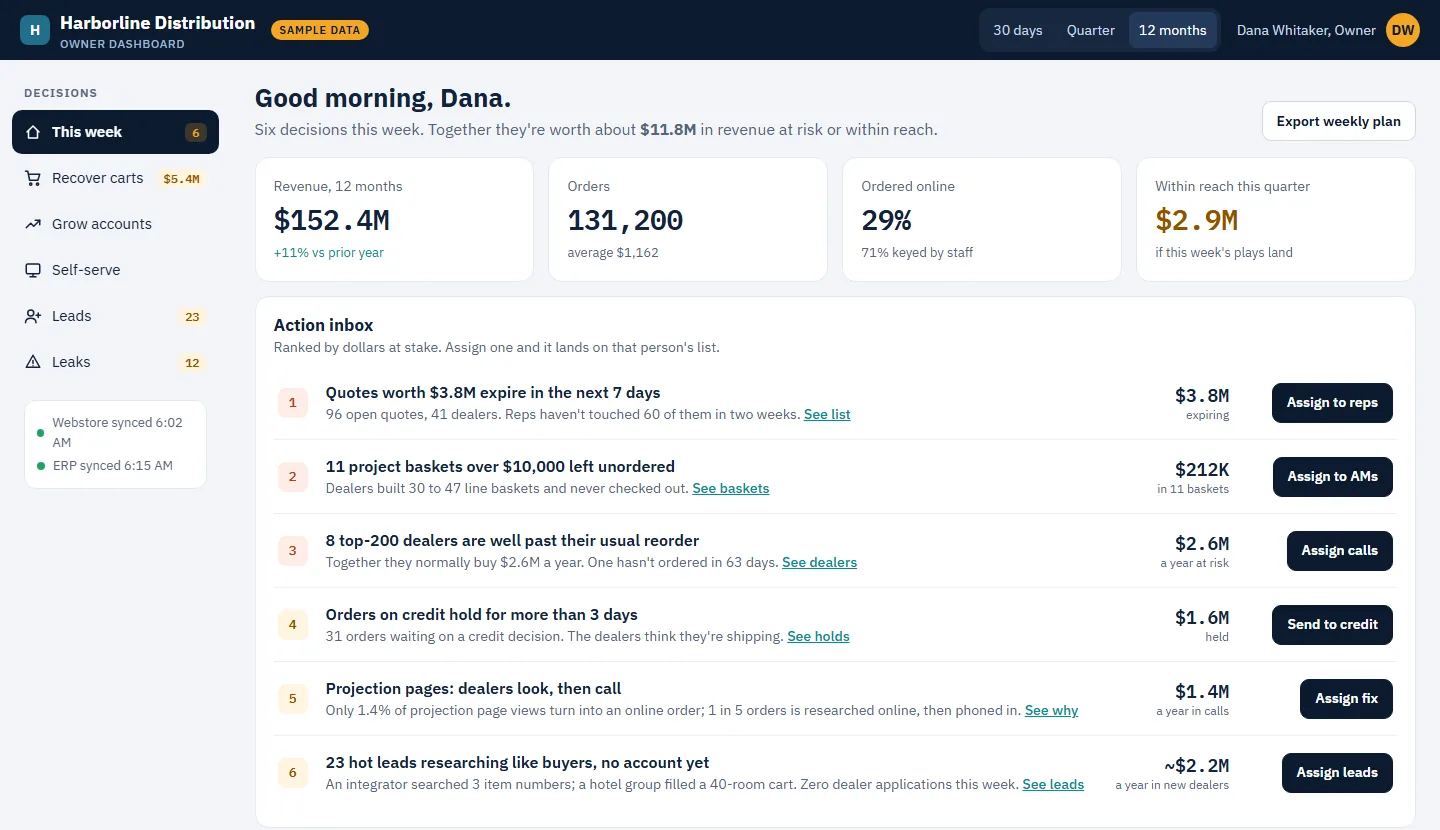
Most dashboards report what happened. This one starts with what to do about it. In the sample, the week's list reads:
- Quotes about to expire. Open quotes that lapse in the next seven days, with the ones no rep has touched in two weeks called out.
- Project baskets left unordered. Carts over $10,000, often 30 to 50 lines, that a dealer built and never checked out. In B2B that is a job being priced, and it deserves a phone call, not a reminder email.
- Dealers past their usual reorder. Measured against each dealer's own rhythm rather than one rule for everyone, so a weekly buyer who goes quiet for a month shows up before a quarterly one does.
- Orders sitting on credit hold. Held for more than three days while the dealer thinks they are shipping.
- Pages where dealers look, then call. Categories researched online and then ordered by phone, which cost staff time on every order.
- Buyers with no account yet. Companies researching like customers, searching item numbers or filling carts, with nowhere to apply.
Each line carries its dollar figure and an assign button, so the decision lands on someone's list rather than in a meeting.
ERP dashboard examples that end in a phone call.
Behind the weekly list are four views. Each one follows the same pattern: what the data shows, the play, and what it is worth. That last part is what makes it a decision rather than a chart.
- Recover carts. Abandoned B2B carts are few but large, and the large ones are whole projects. The play is to send every cart over a threshold to the dealer's rep the next morning with a one-click "turn into a quote", and let small carts get an automatic reminder. The sample counts only the share you can realistically win back, not the whole amount left in carts.
- Grow accounts. A weekly call list for each rep: dealers drifting past their reorder first, then dealers who buy displays but never the mounts and cables they are installed with. The cheapest new revenue is in customers you already have.
- Self-serve. How many orders are researched online and then phoned in, how many dealer logins have never been used, and which product pages convert worst. The play is onboarding the never-logged-in accounts with a saved reorder list from their own history.
- Leads. Visitors who are not customers yet but behave like buyers, ranked by intent, with where they came from. A trade show QR code and a manufacturer's "where to buy" link are usually the hottest sources.
The numbers on the live sample are the sample's own. Yours would show your quotes, your dealers and your carts, and the same views work for a $10M distributor as for a $150M one.
AI where the data is messy, arithmetic where it is not.
A lot of what the dashboard shows is plain arithmetic on your own records: each dealer's usual reorder interval, quote expiry dates, cart value, days on credit hold. We keep it that way on purpose, because an owner should be able to check any number on the screen against the ERP.
AI earns its place in the parts that are messy or end in words:
- Matching web visits, form fills and repeat sessions to real companies, and scoring how much each one is behaving like a buyer.
- Grouping products into what gets installed together, so "never buys mounts" is a finding rather than a guess.
- Reading the free-text side of the ERP, such as quote notes and order comments, that reports usually ignore.
- Drafting the call note or the quote follow-up for the rep, from that dealer's own history.
A person assigns the work and a person sends the message. Nothing on the dashboard contacts a customer on its own. Our wider approach is on the AI page.
Built on your ERP, not another subscription.
There are good AI sales tools for wholesale now, and most of them ask you to move your customers, quotes and orders into their platform and pay per seat to see them again. This is the other route: the dashboard reads the ERP and the webstore you already run, and you own the result.
- Read only. It reads through the ERP's API or a reporting copy where the ERP allows one, and never writes to your books.
- Your ERP. We work most often with Business Central, Dynamics GP, NAV and AX, SAP Business One and ECC, and Epicor. The integration side is the same work described on our BigCommerce ERP integration page.
- Your store. Sana Commerce, BigCommerce, DynamicWeb or a portal we built. Saved and abandoned carts, logins and product views are where the leads and the self-serve findings come from.
- Your CRM stays. Assignments can be pushed into it, so reps work the list where they already work.
The distributor dashboard, answered.
What data does a distributor sales dashboard need?
Mostly what the ERP already holds: customers and ship-tos, open quotes with their expiry dates, invoice and order history, and credit holds. The webstore adds saved and abandoned carts, logins and product views. Lead scoring adds the anonymous side of web analytics. Each of those is read only, so the dashboard never writes to your books.
Is this a software product we license?
No. It is built on your data, for your team, and you own the code and the data. There is no per-user licence. The ongoing work is keeping the data feeds healthy and adjusting the plays as priorities change, which we can take on or your own team can.
Does it replace our CRM?
No. A CRM records what reps did. This dashboard tells the owner which decisions are worth the most this week, and can push the assignments into the CRM so reps work them where they already work.
Which ERPs does it work with?
Any ERP that can be read through an API or a reporting copy. We work most often with Dynamics 365 Business Central, Dynamics GP, NAV and AX, SAP Business One and SAP ECC, and Epicor. On Business Central online that means its APIs, since direct database access is not offered there.
Is the sample dashboard real data?
The patterns are real. The sample was built from a real distributor's ERP and webstore data, with every company and person renamed and every figure changed, so nothing in it identifies the business it came from.
See it with your own numbers.
Twenty minutes is enough to look at the live sample together and talk through which of the six would matter most for your business, and what your ERP and store can already tell us about it.
877.609.9029