
How Sana Commerce Cloud works inside your ERP, which ERPs it connects to, the Sana 9.3 support dates by release, what carries over when you move, and a five-step sequence for planning the move.
Read the full write-up: Sana 9.3 to Sana Commerce Cloud
Chapters
- 0:00Intro
- 0:35Why Sana Commerce Cloud
- 1:13The ERP does the math
- 1:46Which ERPs it connects to
- 2:25A connector inside the ERP
- 3:04Sana 9.3 support dates
- 3:50Staying on 9.3
- 4:25A new product, not a new version
- 5:10What carries over
- 5:48Requirements are the asset
- 6:21Where AI helps
- 6:58A sequence that works
- 7:43Three paths
- 8:16Next steps
Shorts from this video
 Five steps from Sana 9.3 to Sana Commerce Cloud (0:45)
 In Sana Commerce Cloud, the ERP does the math (0:34)
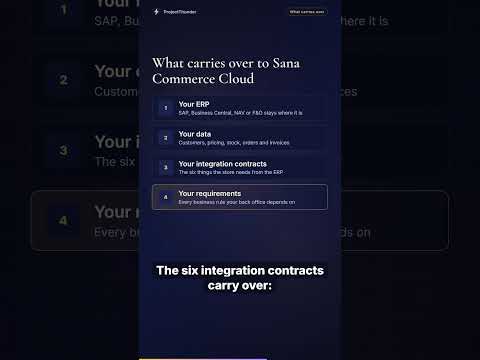 Moving to Sana Commerce Cloud: what carries over (0:38)
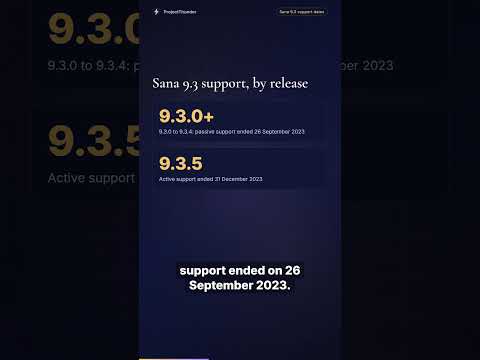 Sana 9.3 support dates, release by release (0:47)
 Why Sana Commerce Cloud is a new Sana product (0:45)
Transcript
Intro
Sana Commerce Cloud is a B2B commerce platform built around your ERP. Your prices, stock and customer terms come from the system of record, so the store reflects what your back office already knows. If you run a store on Sana 9.3 today, the move to Sana Commerce Cloud is the question in front of you, and it is worth planning carefully. In this video, we'll cover how Sana Commerce Cloud works with your ERP, which ERPs it connects to, the Sana 9.3 support dates, what carries over in a move, and a sequence that works.
Why Sana Commerce Cloud
Sana Commerce Cloud starts from one idea. For the data your ERP owns, the storefront reads the ERP instead of relying on a nightly copy. Customer-specific pricing, contracts, promotions and available-to-promise stock come straight from the ERP, behind a short cache. On top of that sit the workflows B2B buyers actually use: quoting, repeat orders, multiple shipping addresses, approvals and account hierarchies. Content, assets and analytics still live alongside the ERP data. The data the buyer transacts on comes from the system of record.
The ERP does the math
Sana states that its add-on runs inside the ERP, uses the ERP's business logic, and that all basket calculations are done by the ERP. So the storefront calls your pricing rather than rebuilding it. Prices, stock, credit holds, customer terms and order status all come from the system that already owns them. Every basket is recalculated in the ERP, so there is no second copy of your pricing logic to keep checking. The browsable catalog is an index refreshed from the ERP on a schedule.
Which ERPs it connects to
Sana's own ERP user guide describes the product as an e-commerce solution for Microsoft Dynamics and SAP. On the Microsoft side, that's Dynamics 365 Business Central, Dynamics 365 Finance and Operations, Dynamics NAV and Dynamics AX. On the SAP side, it's SAP ECC, SAP S/4HANA, and SAP Business One through the Service Layer. Sana's Finance and Operations connector is actively developed. Since a December 2025 connector release, Sana supports the three most recent Microsoft versions of it.
A connector inside the ERP
Most platforms connect to an ERP through middleware sitting between two systems. Sana writes each connector in the ERP's own extension technology. For SAP, that means ABAP objects under Sana's registered namespace, installed with SAP's own Add-on Installation Tool. For Business Central, it's an AL extension on Microsoft AppSource, and for Business Central Cloud, Sana updates it automatically when Microsoft performs a major upgrade. For NAV, it's a Sana codeunit exposed as a web service. Connectors ship on a roughly quarterly release train, and standard customers update at least every two years.
Sana 9.3 support dates
Now to Sana 9.3. The dates depend on your exact release, and they come from Sana's support policy table. For 9.3.0 through 9.3.4, active support ended in September 2021, and passive support ended on 26 September 2023. For 9.3.5, active support ended on 31 December 2023. Passive support, which covers time-and-materials hotfixes for critical issues only, runs until 31 December 2026. Nothing switches off on those dates and no license expires. What goes away is the vendor's safety net: platform patches, bug fixes, an escalation path, and compatibility work.
Staying on 9.3
Staying on 9.3 for a while is a legitimate decision for a store that works and earns. It holds up when a third party who knows the codebase covers what the vendor used to. That means security across the platform and the stack under it. It means keeping customer lookup, pricing, stock, order placement, shipments and invoices working as your ERP changes on its own schedule. And it means keeping up with browsers, payment gateways and certificates. Above all, it means fixing what breaks, by someone who learned the system before the bad day arrived.
A new product, not a new version
When you do move, set one expectation first. Sana Commerce Cloud's initial release is documented as version 10, and that number can look like a routine upgrade from 9.3. Sana addresses this directly in its support documentation, on a page titled Why a New Sana Product, and Not a New Version. Sana Commerce Cloud has a decoupled architecture with a React front end, a new admin, and a content system built around a visual page builder. Sana 9.3 is server-rendered ASP.NET MVC on .NET Framework. So scope the move as a new build from day one. That single decision is most of the difference between a smooth project and a re-scoped one.
What carries over
The storefront layer gets built fresh: templates, page content, customizations and admin settings. The things that matter most to the business carry straight over. Your ERP stays where it is. Your data stays too, because customers, pricing, stock, orders and invoices live in the ERP. That's the best structural property of a Sana implementation. The six integration contracts carry over: customer lookup, price lookup, stock lookup, order placement, shipment polling and invoice fetch. And so does your most valuable asset, your requirements.
Requirements are the asset
After years on a Sana 9 store, the valuable part turns out to be the accumulated decisions behind the code. A PO number might be mandatory and capped at 25 characters because the ERP says so, and a blank one must be rejected. Sub-accounts over an authorization ceiling might route to a parent admin. Sample orders might be a separate ERP document type. And add to cart might be disabled when the ERP holds no price for that customer. Rules like these live in the old code's behaviour, so write them down before you rebuild.
Where AI helps
Much of the move is translation across a known boundary, and that's where current AI tooling does well, used with discipline. The highest-value use is reading every customization and ticket in the old store to produce an as-built record of what it does and why. AI also handles translating Razor views into React components, and mapping old pages onto the new page builder's blocks. And it can generate regression tests from the running 9.3 store. What stays with people is deciding which rules to keep, re-verifying ERP behaviour against the new connector, and reviewing everything generated.
A sequence that works
First, capture the as-built while 9.3 is still running. If you only do one thing, do this, because the window closes when the old store goes dark. Second, classify each customization as keep, drop, or replace with a platform feature. A meaningful share of 9.3 customizations cover things Sana Commerce Cloud now handles natively. Third, confirm the six ERP contracts against the new connector before you commit to a front-end plan. Fourth, rebuild the front end starting with the highest-traffic templates, category and product pages. Fifth, run both stores in parallel with a real dealer group before cutover. A pilot group catches the rules nobody documented.
Three paths
So there are three honest paths for a Sana 9.3 store. The first is to stay on 9.3, properly maintained. For a lot of stores, that's the right call right now. The second is to move to Sana Commerce Cloud, a better platform than 9.3 on nearly every axis that matters, and where the product line is going. Budget it as the new build it is. The third, if the business has changed shape since you chose Sana, is a wider conversation about fit. The one path to avoid is staying on 9.3 with nobody maintaining it.
Next steps
Before you call anyone, find out exactly which 9.3 release you run and who maintains it. Then write down every business rule your back office would notice if it disappeared. ProjectThunder is a Sana-certified partner and has worked on Sana since 2018. We handle the storefront and the seam to the ERP, alongside whoever owns the ERP itself. The full write-up on moving from Sana 9.3 to Sana Commerce Cloud is on projectthunder.com. Thanks for watching.
Narration is an AI voice (Azure). The facts come from the linked write-up.


